
VE-101 : The cinematic video-editing bundle
- 39Training hours
- 13Lectures
- 3Assistant hours
- 950Egyptian pounds
- 10Students maximum

Enrol on this programme now
and take the following offers and discounts, for a limited time
25%discount on morning sessions
712 pounds instead of 950
25%discount on afternoon sessions
712 pounds instead of 950
10%discount on evening sessions
855 pounds instead of 950
* These offers run for a limited period and may change or be withdrawn without notice. Note that the booking itself has to be made inside the academy.
** Morning slots run from 12:30 to 3:30 in the afternoon, afternoon slots from 4 to 7, and evening slots from 7:30 to 10:30 at night.
The complete training bundle for cinematic video editing
Master the three great programs for editing, for cutting video and for film sequences
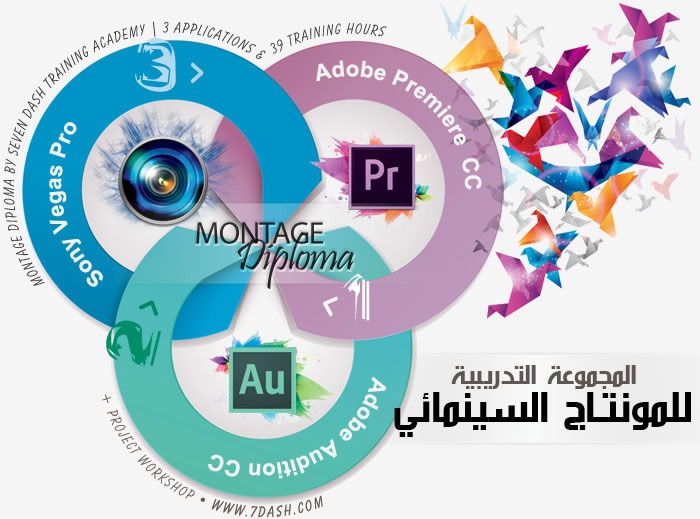
What the programme covers
Adobe premiere CC
- Essential Tasks
- Importing media
- Selecting shots
- Editing to the timeline
- Refining the edit
- Adding transitions
- Adding and adjusting titles
- Adding and adjusting music
- Outputting your show
- Premiere Pro workspace
- An overview of the interface
- Keyboard shortcuts in Premiere Pro
- Ingest
- Create a new project
- Import video and audio files
- Import projects from Final Cut Pro and Avid
- Import directly into the Project panel
- Expanded format support
- Import and relink media in Premiere Pro
- Editing
- Using the Project panel
- Using the Timeline Track controls
- Add clips to a sequence
- Lift and Extract, Delete, and Ripple-Delete
- Create subclips in Premiere Pro
- Nesting a sequence
- Trimming on the Timeline in Premiere Pro
- JKL Trimming
- Using Link Media to quickly locate & relink offline files
- Merge clips automatically using audio waveforms
- Detect duplicate frames automatically
- Multicamera workflows with Premiere Pro
- Titles
- Creating and editing titles
- Create closed captions within Premiere Pro
- Transitions and effects
- Applying basic video and audio transitions
- Modifying transitions
- Applying video effects
- Applying audio effects
- Modifying effects
- Adjust playback speed over time
- Understanding how compositing works
- Layer graphics, clips, and backgrounds in a composition
- Using motion effects to composite clips
- Create a looping, animated background
- Try out three keying effects
- Create animated fly-in for a video title sequence with Photoshop
- Audio
- Understanding audio editing
- Normalizing audio and making sample-level edits
- Using Clip Mixer to adjust volume and pan
- Clean up Premiere Pro audio clips with Audition
- Round-trip a soundtrack from Premiere Pro to Audition for final mixing
- Color
- Correct color and create stylized looks with SpeedGrade
- Color-correct Premiere Pro sequences in SpeedGrade with Direct Link
- Apply Lumetri color-correction effects to your sequences within Premiere
- Output
- Add clips to a sequence
- Apply effects on export with Adobe Media Encoder
- Export closed captions from Premiere Pro to Adobe Media Encoder
- Make a DVD screener of your video project
Adobe Audition CC
- Essential tasks
- Import audio files and browsing media
- Record an audio file
- Make selections for audio editing
- Manually adjust audio level
- Add fades to audio
- Use the Spectral Frequency Display to clean up your audio
- Pitch Correction
- Setting up multitrack sessions
- CD Burning and Importing
- Audition workspace
- Meet 64-bit Adobe Audition
- Comparing audio file and multitrack session workflows
- Audio editing
- Visually preview audio edits as you apply them
- Using the Phase Analysis panel
- Enhanced multitrack editing in Audition CC
- Conform to broadcast standards with the ITU Loudness Radar panel
- Hardware controllers and recordable automation
- Noise reduction and audio cleanup
- Visually identifying noises
- Noise reduction and sound removal strategies
- Cleaning up background noise: Noise and hiss reduction effects
- Using the Click/Pop Eliminator and DeClicker effects
- Audio effects
- An overview of the effects in Audition
- Applying effects to individual files
- Applying effects in a multitrack session
- Using the Sound Remover effect
- Using Pitch Bender and Pitch Shifter effects
- Using the Stereo Expander
- Using the Scientific Filter effect
- Generate Noise in your audio files
Sony Vegas Pro
- Introduction videos and articles to get you started using Vegas Pro
- Adding Media
- Playing Your Project
- Basic Edits
- Markers and Zoom
- Working With Still Images
- Titles and Text
- Transitions
- Video Filters and Effects
- Track Motion
- Working With Audio
- Delivering Your Project
What you need first
The course pack
Meet the trainers on this course
Graphic designer and media consultant
Wael Shaaban Hafez is one of the finest designers in the Arab world and has won a long list of local and international awards. He has more than ten years' experience in graphic design and commercial photography, works to a professional standard across the whole Adobe suite, and has produced work for major Arab and European companies as well as advising several foreign firms as a media consultant. His body of original design work is considerable.
A message for the trainer? Send it from here.A message for the trainer? Send it from here.
What else comes with this course
-

Sit the course again, free -
Drinks cafeteria -

A room worth sitting in -

Support that continues -

Private assistant hours
Reserve your seat on this course
Enter your details now and we will call you to fix a date and take you through the booking.
Have a question ?
We are glad to help you get a better grasp of things, so do not hesitate to contact us if you have any questions at all.