
TP-301 : Design from idea to print
- 140Training hours
- 46Lectures
- 5Assistant hours
- 2900Egyptian pounds
- 12Students maximum
Design from idea to print
The complete training track in graphic design
This is not like any other course in design! On this complete track you will not only learn how to handle the best known design software, or even the quiet tricks most designers use - we take you a very great deal further than that..
We will let you in on the finest secrets of the trade, and on what lies behind the design and the idea .. read on, there is a great deal more!.....
A complete, specialised toolkit
A full suite of programs that lets you work professionally and concentrate on getting the best out of the strengths of each one, so that what you end up with is finished artwork of real quality
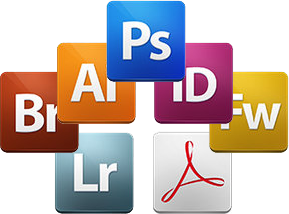
Learn the complete ®Adobe suite for graphic designers: Photshop CC, Illustrator CC, Indesign CC, Lightroom CC, Acrobat XI Pro, Fireworks, Bridge
After the design
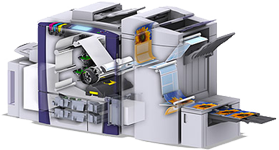
We have noticed how rarely a training programme deals with the craft and the secrets of printing, and since our approach rests on passing on experience and preparing people for the actual job market, this is not a subject we can look past!
On this programme we will not tell you about your design's journey through the press in theory - you will travel with it and see for yourself. The course activities include a live field visit to one of the large printing houses, so that you see, learn and take away experience from the working trade itself.
First impressions Perhaps the hardest problem a newcomer faces in the market is how to judge their own output, and how to convince clients of the quality of their work. On this course you will learn how to handle the meeting with a client, how to price your work, and a great deal of the experience and the trade secrets of the market from the most experienced and best known designers in the field.
From the very first moment
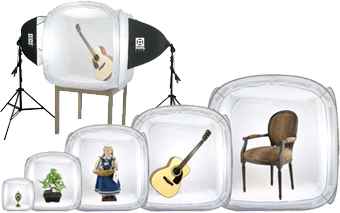
Be with your client from the very first moment. The commercial photography section of our programme lets you bring your own creativity to bear from the beginning: you will learn the foundations of professional product photography, retouching and adjustment, and preparing models ..
And of course we will not forget to take you back out into the trade, through field visits and a special seminar with one of the finest known photographers among the course activities, as well as a product photography workshop.

Working as a team Teams are an old idea and the settled way every large company works, and you will certainly need to be good at operating in those conditions. That is what this complete programme gives you, through a graduation project on which you work exactly as you would in the real market.
The craft and skills of marketing and advertising Learn the secrets and the skills of marketing and advertising: the materials used, the kinds of media, the methods of printing and design, and the quiet know-how and working experience you would not pick up easily even from the trade itself - along with a great deal more that will unquestionably make an expert of you.
And more
You also get these unusual benefits when you enrol on this training track

Activities and events The programme includes a field visit to a large printing house, a special seminar with one of the well known photographers, dedicated workshops on product photography and preparing models, and a good many other activities and events

The certified ®Adobe curriculum Training follows Adobe's certified curriculum, and once you have finished the course you can apply to sit the Adobe exams and earn the international certificates

A free website * Seven Dash gives every student, free of charge, a complete professional website once their studies end, so that they can build a presence of their own on the internet, publish their portfolio, and show and sell their services online
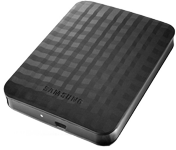
A complete design library on an HD ** With the course you can take a 2 TB external hard disk carrying a complete library of ready-made design elements, which will be a considerable help in producing professional work to the highest standard in the least possible time
* A complete professional website with full services and a domain name of your own choosing, YourCompanyName.com, paid for in full for the first year.
** The cost of the external disk is not included in the course price.







Important notes on the offers and benefits
The offers, benefits and prices published here are available to a limited number of students and are subject to change without notice. Registering online through the form on this page, or by telephone, counts as an expression of interest only, and places no obligation on Seven Dash to honour the benefits, offers and prices current at the time of booking should they change later.
An actual booking has to be made at the company's own premises, with at least 33% of the course fee paid as a deposit, and that secures your right to all the benefits, offers and prices current at the time of booking, even if they are changed later.
What the programme covers
Design from idea to print
The complete training track in graphic design
This is not like any other course in design! On this complete track you will not only learn how to handle the best known design software, or even the quiet tricks most designers use - we take you a very great deal further than that..
We will let you in on the finest secrets of the trade, and on what lies behind the design and the idea .. read on, there is a great deal more!.....
A complete, specialised toolkit
A full suite of programs that lets you work professionally and concentrate on getting the best out of the strengths of each one, so that what you end up with is finished artwork of real quality
Learn the complete ®Adobe suite for graphic designers: Photshop CC, Illustrator CC, Indesign CC, Lightroom CC, Acrobat XI Pro, Fireworks, Bridge
After the design
We have noticed how rarely a training programme deals with the craft and the secrets of printing, and since our approach rests on passing on experience and preparing people for the actual job market, this is not a subject we can look past!
On this programme we will not tell you about your design's journey through the press in theory - you will travel with it and see for yourself. The course activities include a live field visit to one of the large printing houses, so that you see, learn and take away experience from the working trade itself.
First impressions Perhaps the hardest problem a newcomer faces in the market is how to judge their own output, and how to convince clients of the quality of their work. On this course you will learn how to handle the meeting with a client, how to price your work, and a great deal of the experience and the trade secrets of the market from the most experienced and best known designers in the field.
From the very first moment
Be with your client from the very first moment. The commercial photography section of our programme lets you bring your own creativity to bear from the beginning: you will learn the foundations of professional product photography, retouching and adjustment, and preparing models ..
And of course we will not forget to take you back out into the trade, through field visits and a special seminar with one of the finest known photographers among the course activities, as well as a product photography workshop.
Working as a team Teams are an old idea and the settled way every large company works, and you will certainly need to be good at operating in those conditions. That is what this complete programme gives you, through a graduation project on which you work exactly as you would in the real market.
The craft and skills of marketing and advertising Learn the secrets and the skills of marketing and advertising: the materials used, the kinds of media, the methods of printing and design, and the quiet know-how and working experience you would not pick up easily even from the trade itself - along with a great deal more that will unquestionably make an expert of you.
And more
You also get these unusual benefits when you enrol on this training track
Activities and events The programme includes a field visit to a large printing house, a special seminar with one of the well known photographers, dedicated workshops on product photography and preparing models, and a good many other activities and events
The certified ®Adobe curriculum Training follows Adobe's certified curriculum, and once you have finished the course you can apply to sit the Adobe exams and earn the international certificates
A free website * Seven Dash gives every student, free of charge, a complete professional website once their studies end, so that they can build a presence of their own on the internet, publish their portfolio, and show and sell their services online
A complete design library on an HD ** With the course you can take a 2 TB external hard disk carrying a complete library of ready-made design elements, which will be a considerable help in producing professional work to the highest standard in the least possible time
* A complete professional website with full services and a domain name of your own choosing, YourCompanyName.com, paid for in full for the first year.
** The cost of the external disk is not included in the course price.
Important notes on the offers and benefits
The offers, benefits and prices published here are available to a limited number of students and are subject to change without notice. Registering online through the form on this page, or by telephone, counts as an expression of interest only, and places no obligation on Seven Dash to honour the benefits, offers and prices current at the time of booking should they change later.
An actual booking has to be made at the company's own premises, with at least 33% of the course fee paid as a deposit, and that secures your right to all the benefits, offers and prices current at the time of booking, even if they are changed later.
What the programme covers
Adobe Photoshop CC.
This is the biggest, most used and best known program in graphics and in advertising, printed or on the web, and it is the first name in the field - there is no advertising agency and no television station that does not own it. It is also the most powerful tool there is for working on images, compositing them and correcting colour. We will start with the fundamentals and then move on to the advanced material.
- Essential tasks
- Starting in Camera Raw instead of Photoshop
- Using Undo and the History panel
- Removing a person from the background with masking
- Changing the color of an object
- Swapping heads in a family portrait
- Understanding resolution
- Removing blemishes with the Spot Healing Brush and the Patch tool
- Sharpening and perfecting your photos with Smart Sharpen
- Photoshop workspace
- The Photoshop workspace
- Organizing Photoshop panels
- Changing the Photoshop view
- Working with tabbed documents
- Working with the Zoom tool
- Preferences overview
- Rulers, grids and guides in Photoshop CC
- Screen modes
- An overview of Camera Raw
- Layers
- Layers panel explained
- Aligning images within multiple layers
- Reducing chaos with layer groups
- Backgrounds and layers
- Merging layer techniques
- The basics of blend modes
- Understanding layer styles
- Generating a flexible drop shadow
- Create cool effects with layer groups in Photoshop
- Exploring layer basics
- Image adjustments
- Reading a histogram and using the Info panel
- Increasing midtone contrast with Curves
- Shifting colors with Hue/Saturation
- Controlling which layers are affected by an adjustment layer
- Lightening and darkening image areas with Dodge and Burn
- Converting color to black and white
- Creating traditional darkroom toning effects
- Selecting parts of an image
- Basic selection techniques
- Essential selections
- The Magic Wand and Quick Selection tools
- Building and editing a mask
- Selecting soft edge objects with Refine Edge
- Working with Refine Edge
- Cropping and transforming
- Image resizing in Photoshop
- Cropping and straightening an image
- Cropping to ratios, fixed sizes and resolution
- Understanding canvas size
- Crop to add canvas
- The relationship between pixels and image sizing
- Making non-destructive transformations with Smart Objects
- Resizing an image to a smaller size
- Retouching
- Using Content-Aware Fill to remove distractions
- Removing dust and scratches
- Fixing rips and creases
- Painting, drawing, and type
- Vector shape tools
- Draw and align shapes
- Cropping and merging shapes
- Combine shapes
- Working with vector-based shape layers
- Brushes
- Creating a paragraph style
- Design improvements in Photoshop CC
- Type rendering in Photoshop CC
- Filters
- Smart filters and the filter gallery
- Controlling a filter's opacity
- Sharpening an image with Unsharp Mask
- Using the new three-part Blur Gallery
- Creating a soft glow with the Gaussian Blur filter
- Creative uses for Liquify
- Using the Camera Shake Reduction filter
- Sharpening in Photoshop CC
- Printing and sharing photos
- Exploring the print dialog
- Printing smaller size proofs
- Creating contact sheets
- Saving images for the web in Photoshop CC
Adobe Illustrator CC
The finest program there is for professional design. It works in vectors - shapes described by equations and filled with areas of colour - rather than on Photoshop's pixels, which lose quality as you scale them up or down. That is exactly what sets Illustrator apart: enlarge a drawing enormously, or shrink it and enlarge it again, and its quality is never affected. It is used in many fields, print above all - logos, advertising at very large sizes, designs for textiles, ceramics and signage, and elements that can be brought into other programs for video work - as well as for extremely fine illustration by anyone who draws on a tablet. It can carry out a wide range of design tasks, and in these sessions we concentrate on the concepts and the techniques that apply to both print and web workflows. You will be shown the basic elements that make up vector artwork - paths and fills - and how to use every one of the program's powerful drawing tools; how to create documents and work with colour; how to build complex shapes out of simple paths, trace bitmap images and work with lettering. We will of course also discover what layers and symbols are good for, how to edit text, how to draw freehand, and a great deal more: how to output your work in many different formats, how to use vector files and organise your work within the program and between it and the others, transforming objects, creating colour swatches and libraries, tracing and editing paths, understanding the difference between vector and raster design - which is better and what each is used for - and exporting and saving your work and what the various settings do.
- Understanding vector graphics
- Creating documents for different contexts
- Organizing artwork with rulers, guides, and grids
- Making detailed selections
- Resizing, rotating, and transforming objects
- Creating swatches and color libraries
- Working with fills and strokes
- Using the Shape Builder and Image Trace features
- Drawing and editing paths
- Understanding the difference between point and area type
- Adjusting the appearance of artwork with live effects
- Printing, saving, and exporting artwork
Adobe Indesign CC
This is Adobe's publishing program, made for print work: magazines, books, interactive documents and digital magazines. It works easily alongside Adobe's own Photoshop and Illustrator, and you will learn how to open new documents, the sizes used for printing, for books, magazines and the various kinds of brochure, how to set a document up, how to import from and export to the different editing programs, how to organise pages, and how to set page numbers, barcodes and copyright.
- Introduction
- Setting up a new document
- Placing graphics such as QR codes and barcodes
- Formatting objects
- Creating color and gradient swatches
- Organizing projects with layers
- Transforming objects
- Incorporating drop caps, bullets, and numbering
- Applying character and object styles
- Building a multidocument book
- Creating an interactive PDF
- Proofing a document with the Preflight panel
- Printing and exporting a document
Adobe Lightroom CC
This is the program that helps professional photographers manage and adjust digital images and carry out the pre-production work: correcting exposure, setting white balance, adjusting the colour channels, saturation and chromatic aberration, compensating for lens distortion and dealing with blemishes on skin. It also keeps the adjustments with the file so that they can be recovered or changed later, and it doubles as an assistant for presenting and organising digital images, including making backups on different media.
Adobe Acrobat XI Pro
This is Adobe's program for reading PDF files and for quick print assembly. We take a short tour of the Acrobat interface, which shows you how to reach the tools you will use throughout, and then explore how to create files through Acrobat and through other programs; how to edit files right inside Acrobat, how to combine files, add multimedia and insert content, and even how to add backgrounds and improve your files. Acrobat has powerful collaboration tools, and you will learn how to combine files into a portfolio and how to create marks in your own files.
Understanding colour: how to work with it and how to choose it
Colour is one side of the design triangle (image - text - colour). You will learn what colours mean, what the colour wheel is and how to pick colours from it the way professionals do, how colours are made to work together, how colour is prepared for printing, how to use a colour swatch book, and what spot colours are in printing and how they are controlled.
Commercial (product) photography and lighting
Photography is an important part of a designer's work, and a designer has to learn what it is and what it does for them, what the different cameras are and how to choose their own, and what the tools and the equipment of commercial (product) photography are and how they are used.
- The history of commercial photography
- Choosing the right camera and lens
- Setting up the light tent for a product shoot
- Preparing the product for the shoot, and how products differ in front of a camera
- Adjusting the images in Adobe Lightroom and exporting them to Photoshop
- Product photography workshop
- This course includes a special seminar with one of the well known photographers, held with the students
A lecture on retouching
Retouching means working on the model: removing blemishes from the skin and the clothing and applying the effects the model needs. It is how the best photographs of models are produced for posters and magazine covers.
Theory lectures on the schools of design and how graphic design began
Theory lectures on the schools of design around the world and how graphic design came about, the designer's career ladder and what each grade means, how design work is managed, and how designs are priced.
The foundations of the printing craft
Printing is the part that matters most to designers, and the point at which the professionalism of the designer and of the printer both show: once printed, a design can be an example of precision or an example of complete failure. The trainee will learn how to hand a design over to the printer and which points must be checked beforehand, the different kinds of paper and how to choose the right one for each design, the sizes a press works to, what a printing sheet and a gripper edge are, what an imposition form is and how the various forms and boxes are built, and what the printing machines and the equipment used in a press are - with a field visit to a large printing house, so that the trainee sees for himself how the work is done inside a press.
Getting through the interview and convincing the client
(this is a course in human resources and in the personal skills a designer needs). By this stage the trainee has most of the professional designer's foundations. Here the trainee learns the technical vocabulary designers use, which points to concentrate on in an interview, how to develop his work, publishing and printing rights, the difference between original and copied design, the various programs in the field, and the questions a designer is pressed on hardest - with a job and a training opportunity for those who stand out on the diploma.
Advertising and marketing, building campaign plans and costing the advertising product
To become a professional designer you have to understand what advertising and publicity campaigns are, which points to concentrate on, and how to cost each element - printed matter, visuals, outdoor signage - as well as campaign plans, how one company differs from another, the advertising solutions for new and for established products, and where the emphasis falls in each case.
Other subjects covered alongside the training programme
- The knowledge industry.
- An overview of the different kinds of media.
- A focus on the main features of each medium.
- Advertising campaigns.
- Corporate identity.
- Brand image and trademarks.
- A focus on printing techniques.
- Finishing printed files and the pre-press procedures.
Graduation project
A graduation project bringing every three students together to produce one complete piece of work
The course pack
The trainee receives a complete course pack including a DVD with the programs used and their extras, as well as a copy of the book on the craft of printing. Trainees also receive a 2 TB external hard disk carrying a complete library of professional designs to work from
What you need first
No previous experience is required. A higher-education qualification is preferred.
The course pack
The trainee receives a complete course pack including a DVD with the programs used and their extras, as well as a copy of the book on the craft of printing. Trainees also receive a 2 TB external hard disk carrying a complete library of professional designs to work from
Meet the trainers on this course
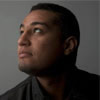
Graphic designer and media consultant
Wael Shaaban Hafez is one of the finest designers in the Arab world and has won a long list of local and international awards. He has more than ten years' experience in graphic design and commercial photography, works to a professional standard across the whole Adobe suite, and has produced work for major Arab and European companies as well as advising several foreign firms as a media consultant. His body of original design work is considerable.
A message for the trainer? Send it from here.A message for the trainer? Send it from here.
What else comes with this course
-
Drinks cafeteria -

A room worth sitting in -

Support that continues -

Private assistant hours
Reserve your seat on this course
Enter your details now and we will call you to fix a date and take you through the booking.
Have a question ?
We are glad to help you get a better grasp of things, so do not hesitate to contact us if you have any questions at all.